How to Cut Proposal Writing Time by 85-90%
Stop spending 30-60 minutes per proposal. Learn how automated proposal generation cuts writing time dramatically while actually improving proposal quality.
How to Cut Proposal Writing Time by 85-90%
Introduction
Sarah, a full-stack developer, sits down at 9 AM to apply for freelance projects. She finds a promising React job on Upwork. She reads the job description carefully (8 minutes), researches the company (5 minutes), drafts a personalized proposal (25 minutes), edits and proofreads (7 minutes), and finally submits (2 minutes). Total time: 47 minutes for one proposal.
By lunchtime, she's written three proposals—2.5 hours gone. If she wants to apply to 15 jobs this week (a reasonable target for active freelancers), that's 12 hours of proposal writing. Time she could be spending on billable work, learning new skills, or actually living her life.
This is the reality for millions of freelancers: proposal writing consumes 5-20 hours per week, representing $13,000-$156,000 in lost billable time annually. But what if you could cut that time by 85-90% while actually improving proposal quality?
The solution is to automate the repetitive parts while maintaining personalization. In this article, we'll explore how automated proposal generation can transform the most time-consuming part of freelancing into a 2-5 minute task—and the principles that make this work. We'll use Proposely as an example to illustrate these concepts, but the core principles apply to any approach you choose.
The Problem: Proposal Writing Takes Too Long
The Time Breakdown
Let's break down what actually happens when you write a proposal:
- Reading & Analysis (5-10 minutes): Understanding the job requirements, identifying key skills needed, noting budget and timeline.
- Research (5-10 minutes): Looking up the client's company, checking their previous projects, understanding their industry.
- Writing (15-30 minutes): Crafting personalized content that demonstrates understanding, highlights relevant experience, and outlines your approach.
- Editing & Proofreading (5-10 minutes): Checking for typos, ensuring tone is right, verifying all requirements are addressed.
- Formatting & Final Review (5-10 minutes): Making sure the proposal looks professional and is ready to submit.
Total: 30-60 minutes per proposal.
The Real Cost
For active freelancers applying to 10-20 jobs per week:
- Weekly Time: 5-20 hours on proposal writing
- Monthly Time: 20-80 hours
- Annual Time: 260-1,040 hours
If you bill at $50-150/hour, that's $13,000-$156,000 in lost billable time every year—just on writing proposals.
Why This Hurts Your Business
Beyond the direct time cost, proposal writing creates several problems:
1. Opportunity Cost: Time spent writing proposals is time not spent on billable work, marketing, or skill development.
2. Mental Fatigue: Writing multiple proposals in a session leads to decision fatigue, reducing quality over time.
3. Reduced Application Volume: The time investment makes freelancers apply to fewer jobs, reducing opportunities.
4. Quality Degradation: When you're tired, proposals become generic or miss key requirements.
Root Causes: Why Proposals Take So Long
1. Manual Research and Analysis
Every proposal requires you to:
- Read and understand the job description
- Identify explicit and implicit requirements
- Research the client/company
- Match your experience to their needs
This cognitive work can't be automated with templates—it requires real thinking, which takes time.
2. Personalization Requirements
Generic proposals get rejected 80-90% of the time. Clients can spot copy-paste content immediately. So you must:
- Reference specific details from the job description
- Highlight relevant portfolio projects
- Match your tone to their communication style
- Address their specific challenges
This personalization is what takes 15-30 minutes per proposal.
3. Context Switching Overhead
The proposal workflow involves constant context switching:
- Browse job board → Read job → Copy text → Switch to document → Paste → Write → Switch back to job board for context → Repeat
Each switch costs 30-60 seconds and breaks your flow state.
4. No Reusable Intelligence
Even though you write similar proposals, you can't easily reuse:
- Your portfolio project descriptions
- Your skills and experience summaries
- Your approach methodologies
- Your communication style
So you rewrite similar content every time.
How This Problem Is Solved
The Automated Workflow
The solution works by eliminating manual steps and automating the repetitive parts. Here's the time difference:
Manual Process:
- Find job on Upwork (2 min)
- Read job description (5 min)
- Copy job description (30 sec)
- Switch to proposal tool (30 sec)
- Paste and format (1 min)
- Research client (5 min)
- Write proposal (25 min)
- Edit and proofread (7 min)
- Submit (2 min) Total: 47 minutes
Automated Approach:
- Click extension on Upwork job (5 sec)
- Job automatically scans and fills form (10 sec)
- Click "Generate Proposal" (5 sec)
- Review and customize (2-5 min)
- Copy and submit (30 sec) Total: 2-5 minutes
The key is automating job data extraction, form pre-filling, and proposal structure generation—while keeping you in control for personalization.
How It Works: Step-by-Step
Step 1: One-Click Job Scanning
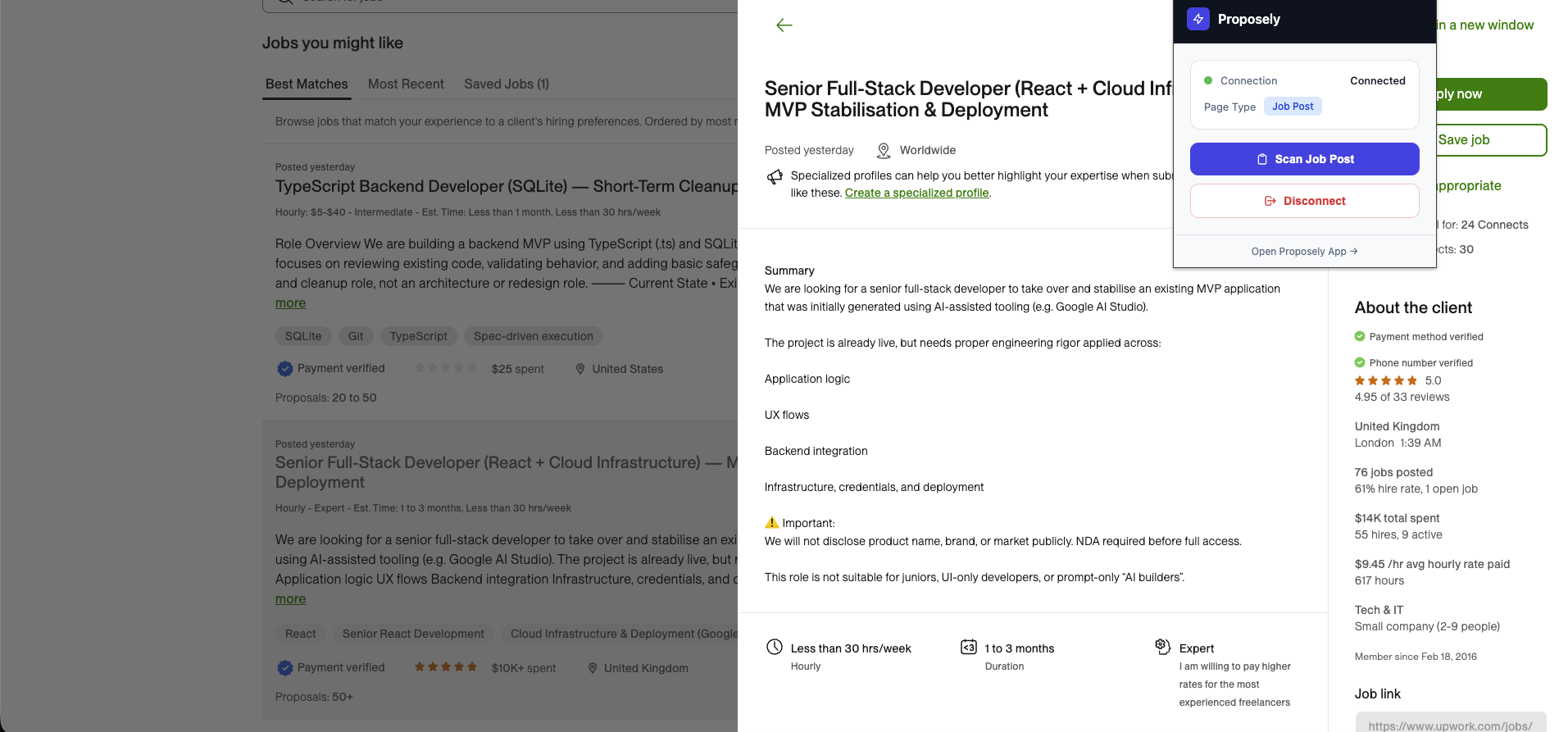 Browser extensions can automatically extract job details from job boards, eliminating manual copy-paste and saving hours every week.
The first time-saver is eliminating copy-paste. Browser extensions can automatically extract job information directly from job board pages. When you click the extension icon on an Upwork job post, the system extracts:
- Job title
- Full job description
- Required skills
- Budget information
- Timeline details
Tools like Proposely implement this through browser extensions that read the page structure and extract relevant information. No copy-paste. No manual extraction. Just one click. For more on how browser extensions eliminate workflow friction, see How Browser Extensions Save 5 Hours Per Week.
Step 2: Automatic Form Pre-Filling
The extracted job data automatically populates your proposal form. If you maintain a profile with your skills and portfolio projects, those are pre-loaded. You just need to:
- Select your experience level (if not saved in profile)
- Choose your tone preference (if not saved)
- Optionally add budget range
The principle here is maintaining a reusable profile—your skills, portfolio, and preferences—so you don't re-enter this information for every proposal.
Step 3: Automated Proposal Generation
When you click "Generate Proposal," the system:
- Analyzes the job description to extract all requirements (explicit and implicit)
- Matches your portfolio projects to the job requirements based on skills
- Selects relevant skills from your saved profile
- Generates a complete proposal (300-500 words) using structured templates with:
- Opening demonstrating understanding
- Relevant experience with case studies
- Clear technical/creative approach
- Scope acknowledgment
- Communication style
- Deliverables
- Engaging close
This structured approach ensures your proposals address all requirements and showcase your best work. Learn more about how automatic portfolio matching works and why structured proposals get better response rates.
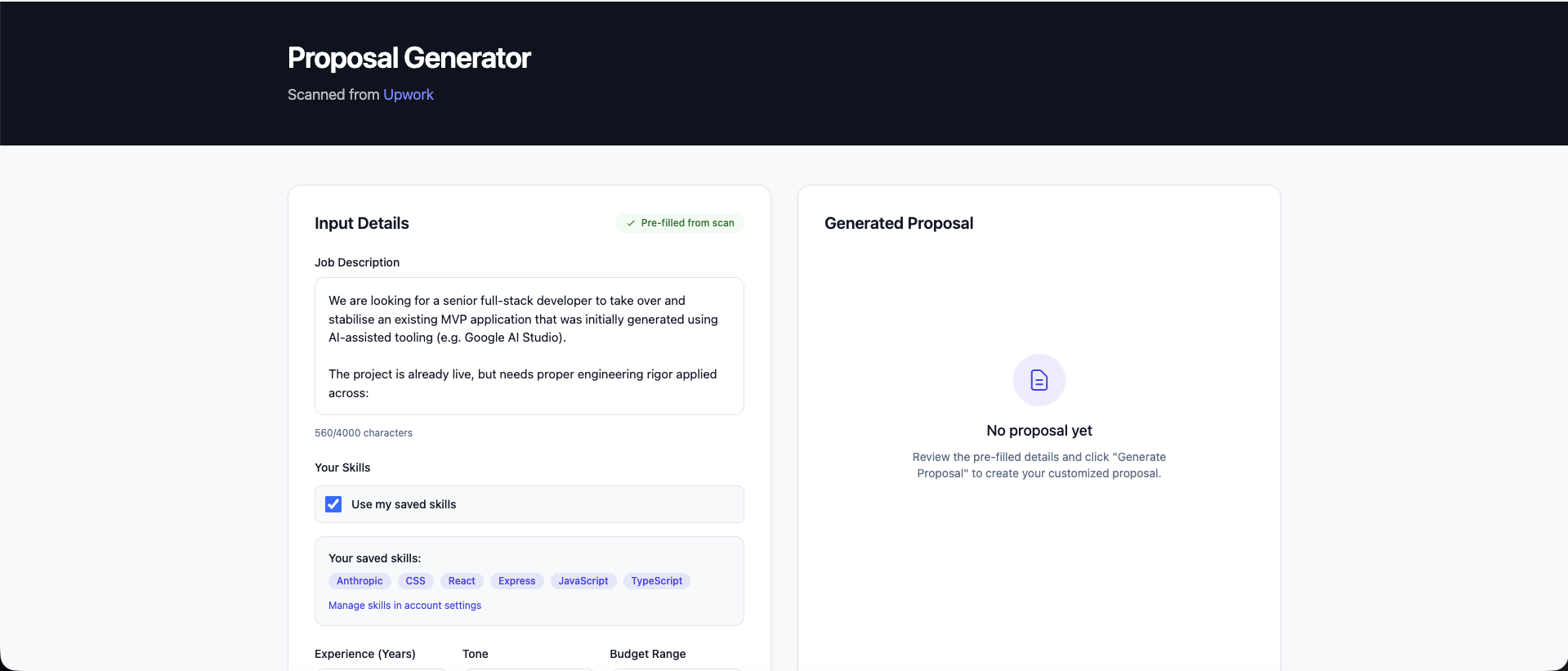 Automated tools generate complete, structured proposals in seconds, incorporating your portfolio projects and skills automatically.
The key principle is using structured templates that follow proven proposal formats, combined with automatic matching of your portfolio and skills to job requirements. This ensures every proposal has the right structure and relevant examples, without you having to remember or manually match your work.
Step 4: Review and Customize
The generated proposal is ready to use, but you maintain full control:
- Edit any section
- Add specific details
- Adjust tone
- Include additional information
The goal is to get you 90-95% of the way there automatically, then you add the personal touches that make it yours.
Step 5: Copy and Submit
One click copies the proposal to your clipboard. Paste it into Upwork, Fiverr, or any platform. Done.
How the System Works
The solution uses several key principles:
- Category-Specific Templates: Different proposal structures for Development, Design, Writing, Marketing, Business, Admin, Professional Services, and Data & Analytics. Each template follows a proven format optimized for what clients in that category want to see.
- Automatic Portfolio Matching: The system identifies which of your portfolio projects match job requirements based on skills. When you tag your projects with skills, the system can automatically select the most relevant ones for each proposal.
- Skill Integration: Your saved skills are automatically incorporated into proposals when relevant, ensuring you don't forget to mention key expertise.
- Tone Consistency: By saving your preferred communication style (professional, friendly, confident), every proposal maintains consistent tone regardless of when you write it or how many you've written. This ensures consistent brand voice across all proposals.
Tools like Proposely implement these principles through structured templates, skill-based matching algorithms, and profile management—creating a system that handles the repetitive work while you focus on personalization.
The Results: Quantified Time Savings
Per-Proposal Savings
- Before: 30-60 minutes
- After: 2-5 minutes
- Savings: 25-58 minutes (85-90% reduction)
Weekly Impact
For a freelancer applying to 15 jobs per week:
- Before: 7.5-15 hours/week
- After: 0.5-1.25 hours/week
- Savings: 7-13.75 hours/week
That's almost two full workdays recovered every week.
Annual Value
- Time Saved: 364-715 hours/year
- At $75/hour: $27,300-$53,625/year in recovered billable time
- ROI: Even with paid tools (typically $8-15/month), the return on investment is substantial—often 200-500x when you factor in recovered billable time
Quality Improvement
But it's not just about time—the automated approach actually improves proposal quality:
- Structure: Every proposal follows a proven structure, ensuring you don't miss key sections
- Personalization: Automatic portfolio matching ensures relevant examples are included
- Completeness: Requirement extraction ensures nothing is missed from the job description
- Consistency: Tone controls maintain professional presentation regardless of when you write
Users of automated proposal tools report 2-3x higher response rates compared to manual proposals, likely because the structured approach ensures all key elements are included consistently.
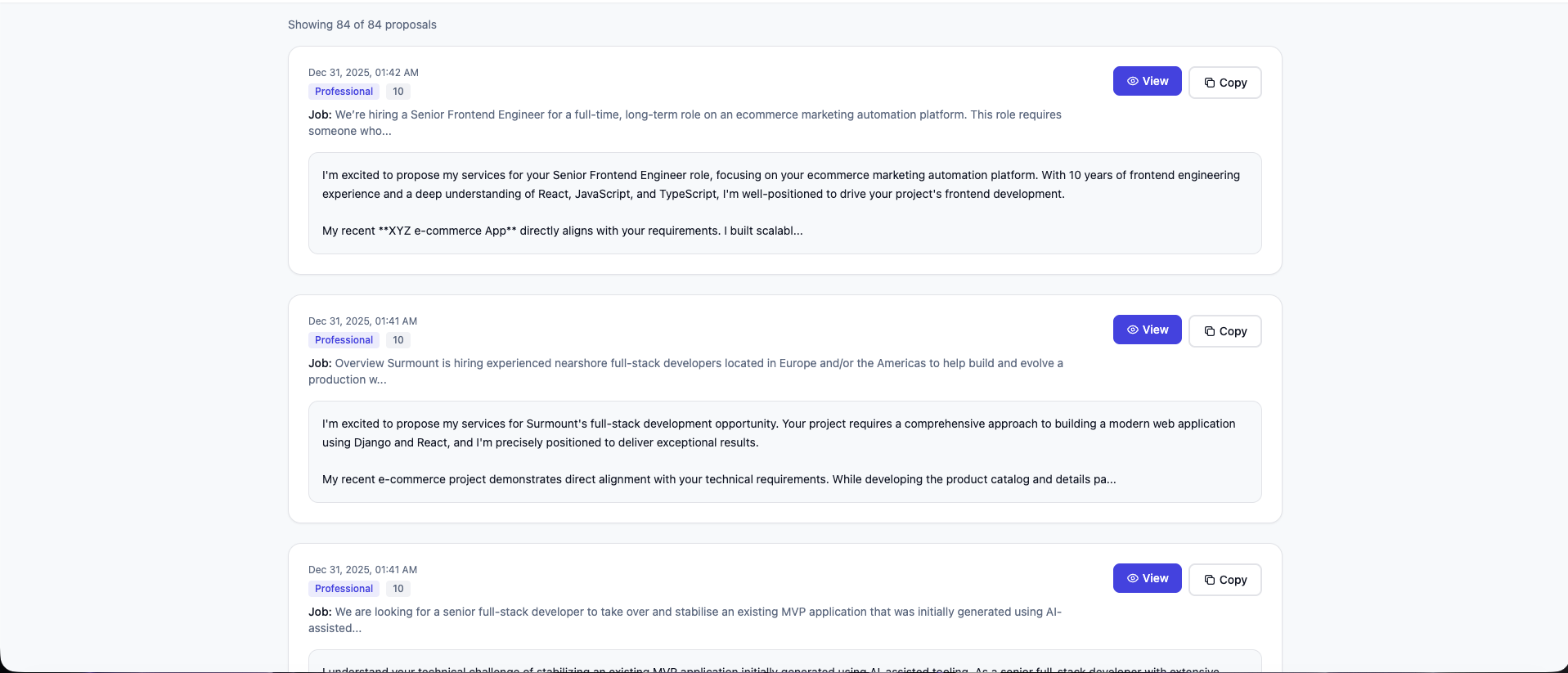 Generate multiple high-quality proposals in the time it used to take to write one.
How to Implement This Approach
If you want to implement this automated approach, here's how the system works:
1. Set Up Your Profile (5 minutes)
The foundation is maintaining a reusable profile:
- Add your skills (or use a skills selector if available)
- Set your experience level
- Choose your preferred tone
- (Optional) Add portfolio projects with skills tagged
This profile becomes your reusable asset—you set it up once, and it's used for every proposal.
2. Use Browser Extensions for Job Scanning (1 minute)
If you use job boards like Upwork, browser extensions can automatically extract job details. Install the extension and connect it to your account. This eliminates copy-paste entirely.
3. Generate Your First Proposal (2 minutes)
- Visit a job post
- Click the extension icon to scan
- Click "Generate Proposal"
- Review and customize
- Copy and submit
Total setup time: 6-8 minutes. You'll save that in your first proposal.
Best Practices
- Keep Your Profile Updated: Add new portfolio projects as you complete them. The system will automatically use them in future proposals when relevant.
- Refine Generated Proposals: While automated proposals are 90-95% ready, always add a personal touch or specific detail that shows you've thought deeply about the project.
- Track What Works: Use proposal history features to see which proposals got responses and refine your approach over time.
- Use Tone Consistently: Set your tone preference once and stick with it. Consistency builds your brand and makes proposals feel more professional.
Conclusion
Proposal writing doesn't have to consume 20 hours of your week. By automating the repetitive parts—job data extraction, form pre-filling, portfolio matching, and structured proposal generation—you can cut proposal time by 85-90% while actually improving quality.
The key principles are:
- Automate extraction: Use browser extensions or tools to extract job data automatically
- Maintain reusable profiles: Set up your skills, portfolio, and preferences once
- Use structured templates: Follow proven proposal formats for consistency
- Keep personalization: Add your unique touches to automated proposals
The math is compelling: If you're spending 10+ hours per week on proposals, automating this process can recover significant billable time. But more importantly, it gives you back your time—time for billable work, skill development, or simply living your life.
If you want to implement this approach, tools like Proposely can help automate the process. You can try it free with 3 proposals per month—no credit card required—to see if this approach works for your workflow.
Want to learn more? Check out our other guides: