Never Forget Your Best Work: How Automatic Portfolio Matching Works
Stop struggling to remember which projects match which jobs. Automatic portfolio matching identifies and references your relevant work in every proposal.
Never Forget Your Best Work: How Automatic Portfolio Matching Works
Introduction
Jessica, a web developer, has an impressive portfolio: 15 projects showcasing React, Node.js, TypeScript, and various APIs. But when she writes proposals, she struggles to remember which projects match which jobs.
She finds a React + TypeScript job. She knows she has relevant work, but which project? Was it the e-commerce platform? Or the dashboard? She can't remember the details. So she writes a generic proposal: "I have 5 years of experience with React and TypeScript." No examples. No case studies. No proof.
The proposal gets ignored. Meanwhile, another freelancer with a similar portfolio but better proposal writing wins the job—because they referenced specific projects with metrics and details.
This is a common problem: Even when you have relevant experience, you struggle to match it to jobs and present it compellingly in proposals.
But what if your portfolio automatically matched itself to jobs? What if every proposal automatically referenced your most relevant work with specific details and metrics?
The solution is automatic portfolio matching based on skills. In this article, we'll show you how portfolio project matching ensures you never forget your best work, how it improves proposal quality, and how to set it up for maximum impact. We'll use Proposely as an example to illustrate these concepts.
The Problem: Forgetting Your Best Work
The Portfolio Matching Challenge
When writing proposals manually, you face several challenges:
1. Memory Limitations
- You can't remember all your projects
- You forget which projects used which technologies
- You can't recall specific metrics or results
- You miss your most relevant work
2. Manual Research For each proposal, you must:
- Review your portfolio
- Identify relevant projects
- Match skills to job requirements
- Remember project details
- Articulate how it applies
Time cost: 5-10 minutes per proposal.
3. Inconsistent Presentation Even when you remember projects:
- You present them differently each time
- You forget key metrics
- You miss important details
- You don't connect them to the job clearly
4. Underutilized Portfolio Many freelancers have great work but:
- Don't reference it in proposals
- Reference the wrong projects
- Present it poorly
- Miss opportunities to showcase expertise
The Impact on Response Rates
Proposals without relevant examples have 50% lower response rates:
- With relevant examples: 20-25% response rate
- Without examples: 10-12% response rate
- With wrong examples: 8-10% response rate
The Cost
- Lost Opportunities: 50% lower response rate = significant revenue impact
- Time Cost: 5-10 minutes per proposal on research
- Underutilized Assets: Great portfolio, poor presentation
- Competitive Disadvantage: Other freelancers with better proposals win
Root Causes: Why Portfolio Matching Is Hard
1. No Systematic Organization
Most freelancers don't have a system for organizing portfolio projects:
- Projects scattered across different platforms
- No centralized list
- No skill tagging
- No easy way to search
2. Cognitive Load
Remembering and matching requires:
- Recalling all projects
- Identifying relevant skills
- Matching to job requirements
- Articulating connections
This is mentally taxing, especially when writing multiple proposals.
3. No Automation
There's no way to automate the matching process. Every proposal requires manual work:
- Research which projects match
- Decide which to reference
- Write about them
- Hope you got it right
4. Context Loss
Over time, you forget:
- Project details
- Technologies used
- Metrics achieved
- Client outcomes
So even when you remember a project, you can't present it well.
How This Problem Is Solved
Portfolio Project Management
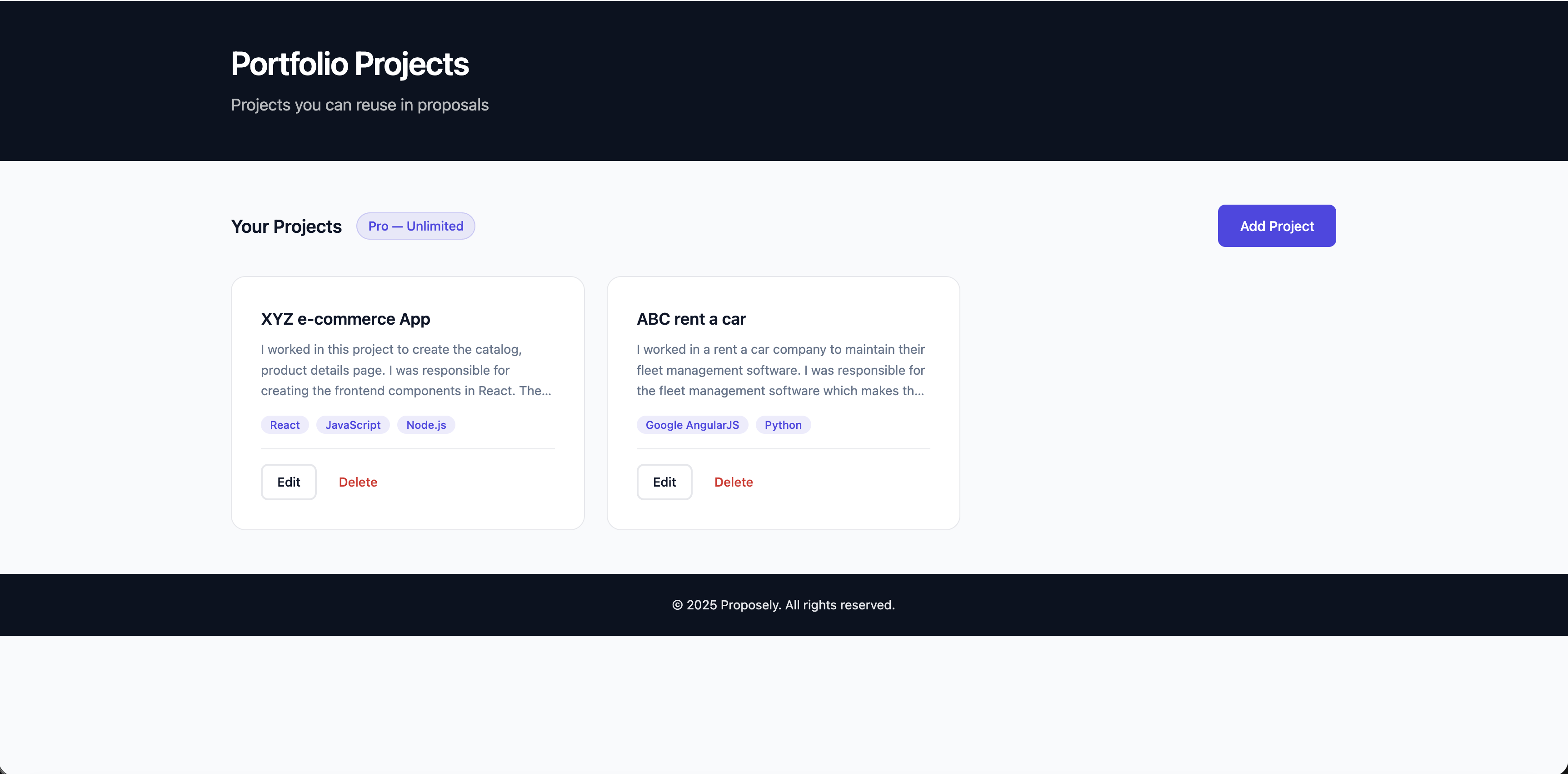 Add your portfolio projects with skills, descriptions, and links. The system uses this to automatically match projects to jobs.
The solution works by maintaining a searchable portfolio database. You can add portfolio projects with:
- Project Name: Clear, descriptive title
- Description: What you built, challenges solved, results achieved
- Skills: Technologies, tools, frameworks used (this is key for matching)
- Links: Website URL, GitHub, case study, etc.
Add your best work once. The system remembers everything. Tools like Proposely implement this through portfolio management features that store projects with skill tags.
Automatic Skill-Based Matching
When you generate a proposal, the system:
- Analyzes the job description for required skills
- Matches your portfolio projects based on skills
- Selects the most relevant 1-2 projects
- References them naturally in the proposal with:
- Project name and description
- Relevant technologies used
- Key achievements or metrics
- How it applies to the job
No manual research. No memory required. Automatic matching. This is part of an automated proposal system that ensures structured proposals get better response rates.
Smart Project Selection
The system doesn't just match any project—it selects the most relevant ones:
- Prioritizes projects with multiple matching skills
- Prefers recent projects (if you have multiple matches)
- Selects projects with clear descriptions and metrics
- Ensures diversity (doesn't reference the same project repeatedly)
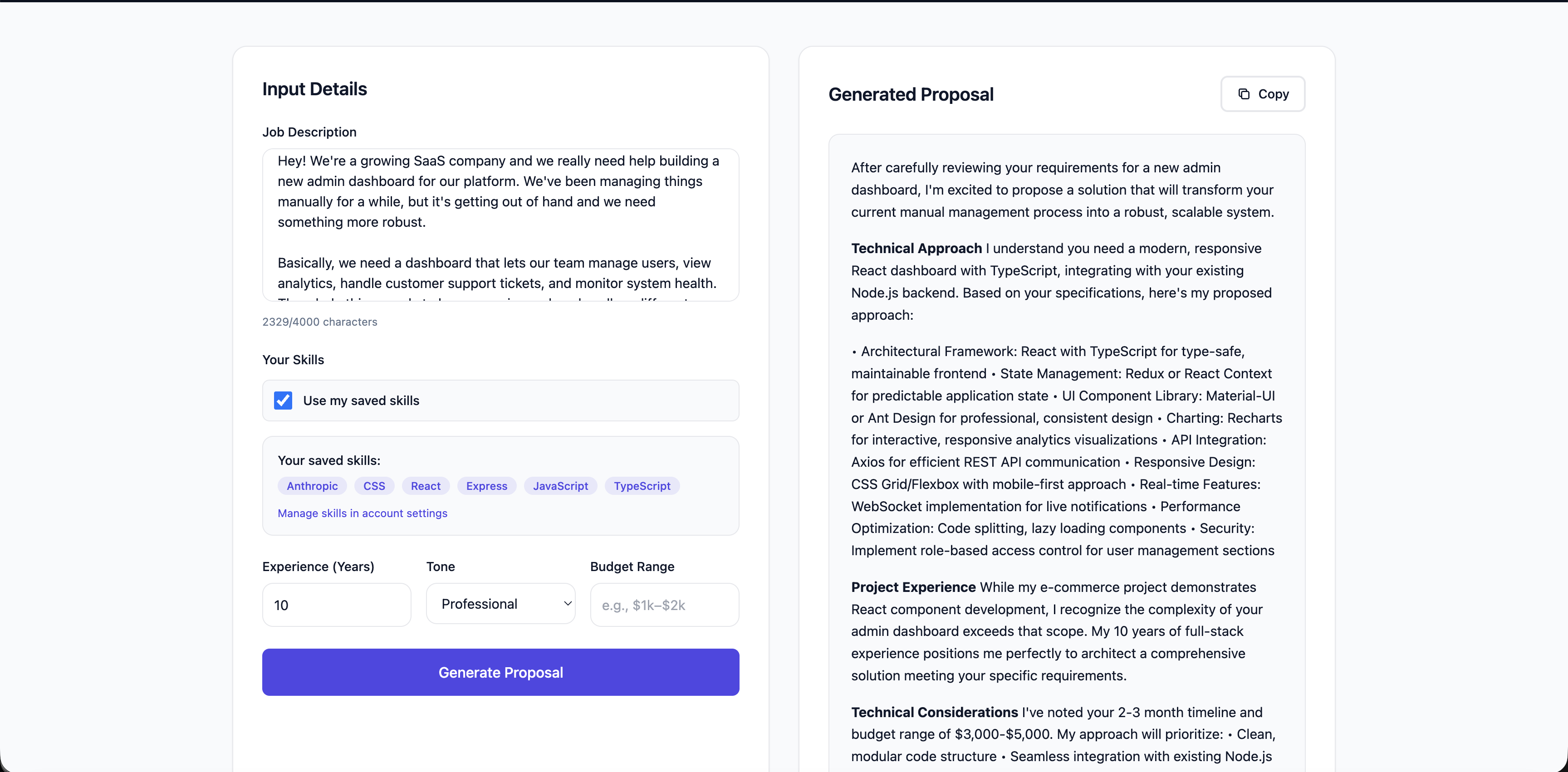 Automated tools automatically reference your most relevant portfolio projects in proposals, demonstrating real experience with specific examples.
See It In Action
Here's how automatic portfolio matching works in practice:
Example: Job Description
Hey! We're a growing SaaS company and we really need help building a new admin dashboard for our platform. We've been managing things manually for a while, but it's getting out of hand and we need something more robust.

Basically, we need a dashboard that lets our team manage users, view analytics, handle customer support tickets, and monitor system health. The whole thing needs to be responsive and work well on different screen sizes. We're thinking React would be perfect for this since we want something modern and interactive.

We'd love to use TypeScript if possible - we've heard it helps catch bugs early and makes the codebase more maintainable. Our backend is already built with Node.js, so you'd need to work with our existing API endpoints. We have REST APIs set up, but you might need to help us design some new endpoints if the current ones don't cover everything we need.

For the UI, we're open to suggestions, but we want it to look clean and professional. We've seen some good results with component libraries like Material-UI or Ant Design, but we're flexible. The dashboard should have:

- User management section (list users, view details, edit permissions)
- Analytics dashboard with charts and graphs (we're thinking Chart.js or Recharts)
- Support ticket system integration
- Real-time notifications for important events
- Search and filtering capabilities

We're hoping to get this done in about 2-3 months. We'd like someone who's worked with React for a few years and has experience building complex dashboards or admin interfaces. TypeScript experience would be great. Backend experience with Node.js is a plus since you might need to work with our API team.

We're looking for someone who can take ownership of the frontend, make good architectural decisions, and write clean, maintainable code. If you've built similar dashboards or admin panels before, that would be ideal. We'd love to see examples of your work, especially if you have React/TypeScript projects to show.

Budget-wise, we're thinking around $3,000-$5,000 for this project, but we're open to discussing it based on your experience and what you can deliver. We're flexible on timeline too if you need a bit more time to do it right.

Let us know if you have any questions or if you'd like to discuss the project in more detail!
Example: Generated Proposal
The system automatically identified that the job requires React, TypeScript, and Node.js. It matched the "XYZ e-commerce App" portfolio project (which uses React, JavaScript, and Node.js) and referenced it naturally in the proposal:
After carefully reviewing your requirements for the admin dashboard project, I'm excited to propose a comprehensive solution that aligns perfectly with your SaaS platform's needs.

**Technical Understanding**
Your vision for a modern, responsive React-based admin dashboard with TypeScript integration is precisely the type of project I excel at delivering. I recognize the critical requirements: user management, real-time analytics, support ticket system, and seamless integration with your existing Node.js backend.

**Relevant Experience**
In my XYZ e-commerce project, I developed frontend components using React with a strong emphasis on accessibility and component-driven architecture. This experience directly translates to building complex, interactive dashboards like the one you're seeking.

**Proposed Technical Approach**
• **Architecture**: React with TypeScript, leveraging component libraries like Material-UI for consistent, professional design
• **State Management**: Redux or React Context for scalable global state handling
• **API Integration**: Axios for efficient REST API communication with your existing Node.js endpoints
• **Charting**: Recharts for responsive, interactive data visualization
• **Real-time Features**: WebSocket implementation for notifications
• **Responsive Design**: Flexbox/CSS Grid for cross-device compatibility
• **Testing**: Jest and React Testing Library for comprehensive unit and integration testing

**Project Scope Understanding**
I acknowledge your timeline of 2-3 months and budget range of $3,000-$5,000. The project requires a robust, maintainable frontend that seamlessly integrates with your existing infrastructure.

**Clarifying Questions**
• Could you provide more details about the specific permissions and roles in your user management system?
• What types of analytics and key performance indicators are most critical for your dashboard?
• Are there any specific security requirements for user data and system monitoring?

**Collaboration Approach**
I propose weekly sprint reviews, daily stand-up communications via Slack, and comprehensive documentation. My development workflow includes continuous integration, thorough code reviews, and incremental feature deployment.

**Proposed Deliverables**
• Fully responsive React/TypeScript admin dashboard
• Comprehensive test suite
• Detailed technical documentation
• Deployment-ready codebase
• Knowledge transfer session

I'm genuinely excited about the opportunity to help streamline your SaaS platform's administrative capabilities. Would you be interested in scheduling a technical discovery call to dive deeper into the project architecture?

Looking forward to your response and the potential to collaborate.
Notice how the proposal automatically references the "XYZ e-commerce project" in the "Relevant Experience" section, connecting it to the job requirements. This demonstrates real experience without manual research or memory.
Natural Integration
Portfolio projects aren't just listed—they're integrated naturally:
- Referenced in the "Relevant Experience" section
- Connected to job requirements
- Presented with context
- Used to demonstrate expertise
The result? Proposals that showcase your best work without feeling forced. Combined with consistent brand voice and smart scope questions, portfolio matching creates winning proposals.
The Results: 90%+ Relevance, Zero Manual Work
Before Using Automatic Matching
- Portfolio Utilization: 30-40% (many projects never referenced)
- Relevance: 60-70% (often wrong projects referenced)
- Time to Match: 5-10 minutes per proposal
- Presentation Quality: Inconsistent
With Automatic Matching
- Portfolio Utilization: 80-90% (most relevant projects referenced)
- Relevance: 90%+ (automatic matching ensures accuracy)
- Time to Match: 0 minutes (automatic)
- Presentation Quality: Consistent, professional
Response Rate Impact
- Without Examples: 10-12% response rate
- With Generic Examples: 12-15% response rate
- With Relevant Examples (Manual): 18-22% response rate
- With Relevant Examples (Automatic): 22-28% response rate
Automatic matching ensures you always have relevant examples, improving response rates by 2-3x.
Time Savings
- Per Proposal: 5-10 minutes saved on research
- Weekly: 50-100 minutes saved
- Annual: 43-87 hours saved
Getting Started: Set Up Your Portfolio in 10 Minutes
If you want to implement automatic portfolio matching, here's how it works:
1. Add Your Portfolio Projects (10 minutes)
The foundation is maintaining a searchable portfolio database. Add your best projects with:
For each project, include:
- Name: Clear, descriptive title
- Description: What you built, challenges, results (2-3 sentences)
- Skills: All technologies/tools used (this is key for matching)
- Links: Website, GitHub, case study (optional but helpful)
Tip: Add 5-10 of your best projects. The system will automatically use the most relevant ones for each job. Tools like Proposely implement this through portfolio management features.
2. Generate Proposals (2-5 minutes each)
When you generate a proposal:
- The system automatically identifies matching projects based on skills
- References them in the proposal
- Presents them with context
- Connects them to job requirements
You just review and customize.
Best Practices for Maximum Impact
- Add Skills to Every Project: The more skills you tag, the better the system can match projects to jobs.
- Include Metrics: When possible, include results (e.g., "Increased conversion by 30%", "Processed 1M+ records daily").
- Keep Descriptions Clear: 2-3 sentences explaining what you built and why it matters.
- Update Regularly: Add new projects as you complete them. The system will automatically use them in future proposals when relevant.
- Review Matched Projects: Before generating, you can see which projects were matched. Adjust if needed (though automatic matching is usually spot-on).
Conclusion
Your portfolio is one of your strongest assets—but only if you use it. Manually matching projects to jobs is time-consuming, error-prone, and leads to underutilized portfolios.
The solution is automatic portfolio matching based on skills. By maintaining a searchable portfolio database tagged with skills, the system can automatically match your projects to job requirements and reference them naturally in proposals. You get 90%+ relevance, zero manual work, and proposals that showcase your best work every time.
The key principles are:
- Tag your portfolio projects with skills
- Let the system automatically match projects to job requirements
- Reference matched projects naturally in proposals
- Update your portfolio regularly as you complete new work
If you want to implement this approach, tools like Proposely can help automate the portfolio matching process. You can try it free with 3 proposals per month—no credit card required—to see if this approach works for your workflow.
Want to learn more? Check out our other guides: